


- What an anonymous crypto wallet is
- Why Cake Wallet
- How to set up Cake Wallet for maximum privacy
- Installing and verifying the app
- Creating a wallet and the seed phrase
- Connecting your own node
- Tor and turning off extra requests
- Your own crypto nodes: at home or on a VPS
- Cake Wallet alternatives: wallet comparison
- Desktop (Windows, macOS, Linux)
- Android
- iOS
- Browser and hardware wallets
- Common mistakes that kill privacy
- Anonymous crypto wallet FAQ
Cake Wallet is one of the best options if you want an anonymous crypto wallet without KYC: the keys stay with you, the source code is open, one app covers a dozen coins, and you can connect to your own nodes and over Tor. Below is what “anonymous” really means, how to set the app up for maximum privacy and which alternatives exist for desktop, Android, iOS and hardware devices.
Updated in September 2026: current version 6.4, installing from the developers’ F-Droid repository, built-in Tor, Trezor support, a step-by-step own-node setup and a wallet comparison table.
What an anonymous crypto wallet is
An anonymous crypto wallet (also called a private crypto wallet) is an app that:
- does not require KYC — no passport, selfie or address;
- does not collect personal data or require an account;
- keeps private keys only on your device (non-custodial);
- does not track your transactions on its own servers.
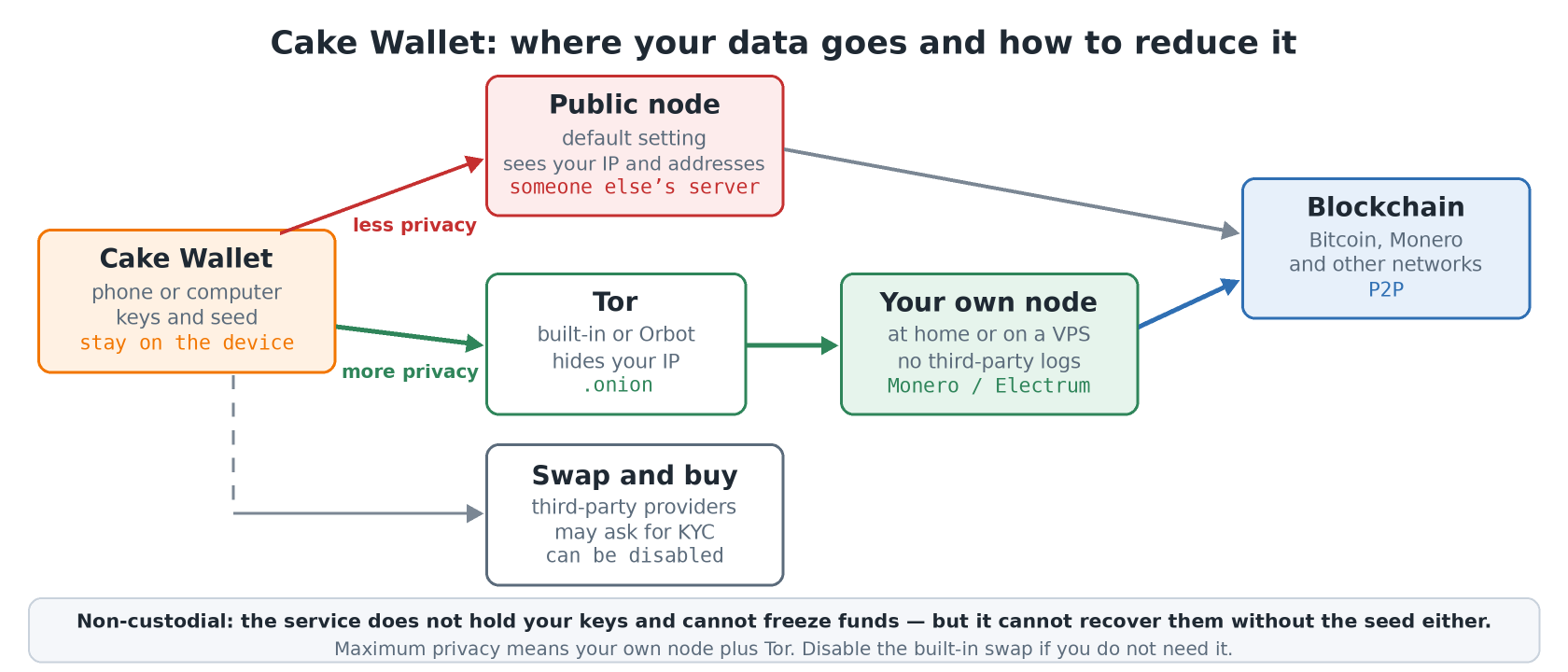
Even such a wallet leaks metadata when it talks to someone else’s servers: a public node sees your IP and the addresses you query. That is why maximum privacy comes from the combination of a private wallet + your own node + Tor.
Keep in mind: a wallet without KYC does not exempt you from local laws. Check the rules and tax obligations in your country. Privacy here means protecting your data from leaks and service-side tracking, not a way around the rules.
Why Cake Wallet
- No KYC, no account — install, create a wallet, use it.
- Non-custodial — the keys and seed phrase are yours alone. The service cannot freeze your funds, but it cannot recover them without the seed either.
- Open source on GitHub — you can review the code and check the APK against the release hashes.
- Multi-currency — Monero, Bitcoin (including Lightning), Litecoin, Ethereum, Solana, Tron, Zcash, Zano and more in one app.
- Own nodes and Tor — connect your own node and route traffic through built-in Tor or Orbot.
- Hardware wallets — in 2026 the app added Trezor signing for Bitcoin and Monero, so keys stay offline.
- Phone and desktop — Android, iOS, macOS and Linux. Windows builds last shipped with version 5.9; the 6.x line has none.
How to set up Cake Wallet for maximum privacy
Installing and verifying the app
Download only from the official website, the App Store or Google Play. On Android without Google services you have three options: add the developers’ F-Droid repository (the app is not in the main F-Droid catalog), install from Accrescent or grab the APK from the releases page. All three are signed with the same key, and each release lists SHA-256 hashes of the files — check them before installing. I covered adding third-party repositories in the F-Droid 2.0 article.
Creating a wallet and the seed phrase
- Pick a coin and, before entering the wallet name, open Advanced Privacy Settings: you can disable fiat rates and the built-in swap right away (or allow them over Tor only) and set your own node.
- Write the seed phrase on paper or a metal plate. Do not take a screenshot or keep it in the cloud or a messenger.
- Make an encrypted backup of all wallets: menu → Security and backup → Create backup. The app shows a password for the file — store it separately from the file.
Connecting your own node
Open the menu → Nodes (or tap the sync status bar on the home screen) → Add new node. Enter the address and port — usually 18081 or 18089 for Monero, and your own Electrum server for Bitcoin and Litecoin. Tick Trusted only for your own node: syncing gets faster, but the app trusts it completely. The node is set per coin type, i.e. for all Monero wallets or all Bitcoin wallets at once.
Tor and turning off extra requests
- In Connection and sync, turn on Enable built-in Tor. The toggle is not available on every platform — if it is missing, install Orbot in VPN mode and enable Tor for the whole device or just the wallet.
- Connect to a node with a
.onionaddress: if Tor stops working, the app simply fails to connect instead of falling back to the open internet. - Do the first Monero sync directly against your own node and switch to Tor afterwards: syncing many blocks over Tor can take days.
- In Privacy settings, disable fiat rates (fiat API) and the built-in swap if you do not need them. Swaps and purchases go through third-party providers that may ask for KYC — “no KYC” applies to the wallet itself.
Your own crypto nodes: at home or on a VPS
A private crypto wallet reaches its full potential when it does not depend on other people’s servers. Your own node gives you:
- independence from third-party RPC and Electrum servers;
- no logs of your requests at third parties;
- your own mempool and full blockchain verification.
You can run a Monero node on a home server or a VPS by following the official guide. If you pick a VPS, harden it first with the server security checklist: key-only SSH, a firewall and Fail2ban. To reach a home node while away, OpenZiti works well — the node is visible only to your devices, with no open ports.
A convenient ready-made option is AlfaHost with Full Node scripts: ready setups for popular networks, support help and fast syncing. The link gives 5% off your first order.
Cake Wallet alternatives: wallet comparison
| Wallet | Platforms | Coins | Own node | Tor |
|---|---|---|---|---|
| Cake Wallet | Android, iOS, macOS, Linux | XMR, BTC, LTC, ETH, SOL, TRX, ZEC… | yes | built-in or Orbot |
| Unstoppable | Android, iOS | BTC, ETH, LTC, DASH, TRX, tokens | yes | Orbot |
| Electrum | Windows, macOS, Linux, Android | BTC, Lightning | yes | proxy |
| Sparrow | Windows, macOS, Linux | BTC | yes | built-in |
| Feather | Windows, macOS, Linux | XMR | yes | built-in |
| ANONERO | Android | XMR | yes | mandatory |
Desktop (Windows, macOS, Linux)
- Electrum — the Bitcoin classic, supports your own server and Lightning.
- Sparrow — a strong Bitcoin-only choice: coin control, hardware wallets, built-in Tor.
- Feather — a lightweight Monero wallet with built-in Tor.
Android
- Unstoppable Wallet from F-Droid — multi-currency and also supports your own nodes.
- Electrum from F-Droid — Bitcoin and Lightning.
- Brume Wallet from F-Droid — for Ethereum networks.
- ANONERO — Monero-only and Android-only, but with the strictest privacy: all traffic is forced through Tor or a proxy, there are no third-party services (no rates, no swaps), addresses are never reused, and you get coin control and offline transaction signing. The Polyseed seed phrase (16 words) is always encrypted with an extra passphrase — store it together with the seed. There are two flavors: ANON (Tor only) and NERO (proxy of your choice). The app is not on Google Play or F-Droid; it is distributed through the project’s website — check the APK against the signed release hashes.
F-Droid builds apps from source and rejects trackers, and for some apps the builds are also reproducible — they can be matched byte for byte with the source. For wallets that is a real advantage over regular store builds.
iOS
- Unstoppable — a multi-currency option focused on privacy.
- Phoenix — open-source self-custodial Bitcoin and Lightning.
- Zeus — Lightning with your own node; Fully Noded — Bitcoin Core over RPC, rough interface.
- BlueWallet — only with your own Electrum server; there are negative reviews, use with care.
- For Ethereum — Rabby Wallet and Rainbow.
Browser and hardware wallets
Extension: Enkrypt for Ethereum and tokens.
- Trezor — now works directly with the Cake app for Bitcoin and Monero.
- Foundation Passport — the strongest privacy focus among hardware wallets.
- SafePal — secure, but not ideal for anonymity.
- Tangem — convenient, but with privacy questions.
Common mistakes that kill privacy
- Buying crypto on a KYC exchange and withdrawing straight to a private wallet: the exchange already knows the link between you and that address.
- Reusing one address for every payment — Monero has subaddresses for this, and for Bitcoin the app generates new addresses automatically.
- Keeping the seed phrase in phone notes, the cloud or a screenshot.
- APKs from unofficial sites and “modded” versions — the most common way to lose funds.
Anonymous crypto wallet FAQ
Is Cake Wallet an anonymous wallet?
Yes, in the sense of non-custodial and no KYC: no account is needed and the keys stay on your device. For network privacy connect your own node and Tor, otherwise a public node sees your IP.
Is Cake Wallet on F-Droid?
It is not in the main F-Droid catalog, but the developers run their own repository at fdroid.cakelabs.com. You can also install it from Accrescent or as an APK from GitHub — all builds use the same signing key.
Cake Wallet or Unstoppable Wallet?
Both are multi-currency and support your own nodes. Unstoppable is in the main F-Droid catalog. Cake Wallet supports Monero, runs on desktop too (macOS, Linux) and has built-in Tor.
Do I really need my own node?
Not to get started, but for maximum privacy, yes. Without one the wallet talks to someone else’s infrastructure that sees your requests.
How do I enable Tor in Cake Wallet?
In Connection and sync, turn on Enable built-in Tor. If your platform has no such toggle, use Orbot in VPN mode and a node with a .onion address.
Do swaps inside Cake Wallet require KYC?
The wallet itself does not, but swaps and purchases go through third-party providers and some of them may ask for verification. If you do not need swaps, turn them off in Privacy settings.
What happens if I lose my phone?
Restore the wallet on a new device from the seed phrase or from the encrypted backup with its password. Without the seed or a backup the funds cannot be recovered — the service does not have your keys.
What is the most private Monero wallet for Android?
ANONERO: traffic goes only through Tor or a proxy, there are no third-party services and the seed is always passphrase-encrypted. It is less convenient and Monero-only, so for several coins or iOS Cake Wallet is the better fit.
Does Cake Wallet work with hardware wallets?
Yes. In 2026 the app added Trezor signing for Bitcoin and Monero: the keys stay on the device and the app acts as the interface.
No email, no trackers — just the update feed.