

Matomo is a visit counter you run on your own server. It answers the ordinary questions: how many people came, which pages they opened, where they came from, and whether they reached a goal or an order. The numbers stay on your machine, not in someone else’s account. The program is free to install, and the interface is available in English.
People install it when they want the reports on a machine they control. The server stays yours even if a hosted account is temporarily down. The questions are the ordinary ones: who came, what they looked at, and where they came from.
Matomo starts a new history on the day you install it. Reports from a counter you already use do not move over by themselves, so leave that counter in place if you still need it. Session recording and heatmaps are not in the free version. This article does not set up Matomo Cloud. Below is how to install Matomo on a VPS with Ubuntu 24.04: with commands, or through Fastpanel and ispmanager.
Which server to get
How many CPU cores, how much memory, and how much disk to take is written on the Matomo requirements page, in the section on server size. What matters is how many page views you expect per month. The numbers below were checked on 13 October 2026. Each row is the minimum recommended configuration for that load.
| Load | What Matomo recommends |
|---|---|
| Up to 100,000 page views a month | One server for the database and the panel: 2 CPU, 2 GB RAM, 50 GB SSD |
| Up to 1,000,000 page views a month | One server can still be enough: 4 CPU, 8 GB RAM, 250 GB SSD |
| More than 1 million actions a month | Two servers, database separate. This guide stays on one machine |
Up to 100,000 page views a month, Matomo recommends one server for the database and the panel: 2 CPU, 2 GB RAM, and a 50 GB SSD. Up to a million page views, one server can still be enough, but the configuration changes: 4 CPU, 8 GB RAM, and a 250 GB SSD. On that page both rows are called the minimum recommended setup for their load. They are not a small plan and a spare plan. Above a million actions a month, Matomo wants two servers, with the database on its own. On a machine with 2 GB of RAM, do not copy high-traffic settings that give the database several gigabytes. The database will take that memory away from PHP.
Rent a VPS with these numbers. This guide has no ready-made Matomo image: you start from an empty server and install the software yourself.
Do not open the panel on the front page of the site you measure. Give it its own name on the same domain, for example analytics.example.com. That is a subdomain. You do not need to buy a second domain for the panel. In the commands below, replace the example with your name: in nginx, in the certificate, and in the scheduled job. The A record must point at the VPS before you issue the certificate.
Through Fastpanel or ispmanager
Fastpanel is a panel for managing sites. People often use it when ordinary website hosting is no longer enough. It installs only on a clean system: the software from the later sections must not be there yet. If nginx or MariaDB is already installed, the panel installer will refuse this server. That is in Fastpanel’s own requirements.
On Ubuntu 24.04, SSH in as root. First the updates from the Fastpanel install page, then a reboot:
apt-get update && apt-get upgrade && apt-get install ca-certificates wget && rebootAfter the reboot, the panel itself:
wget https://repo.fastpanel.direct/install_fastpanel.sh -O - | bash -At the end the script prints https://server-address:8888, a login (usually fastuser), and a password. Open port 8888 next to 22, 80, and 443, or the panel page will not open from outside. The first login asks for an email. The license is free, and the message with it arrives at that address.
After that the panel only needs a site and a database. Click Create site (Создать сайт, if the panel is in Russian) and choose PHP, not WordPress. In the domain field put the panel name, for example analytics.example.com. The A record must already point at the VPS. In the same window turn on a database and write down the name, user, and password: the Matomo installer will ask for them. The charset stays UTF-8. If you did not create the database with the site, add it separately: Databases → New database (Базы данных → Новая база данных). Use PHP 8.1 or newer. On Ubuntu 24.04, take 8.3 if it is in the list. Issue the certificate from the site card. Do not put this article’s certbot or nginx config on top of the panel. The panel already serves the site.
Put the Matomo files in the site directory. The path is on the site card. On Fastpanel it is usually /var/www/SITEUSER/data/www/domain. In the command below, replace SITEUSER with the site owner from the panel. If the directory has a placeholder index.html, delete it, or that page will open instead of Matomo.
cd /var/www/SITEUSER/data/www/analytics.example.com
rm -f index.html
wget https://builds.matomo.org/matomo.zip
unzip matomo.zip
cp -a matomo/. .
rm -rf matomo matomo.zip
chown -R SITEUSER:SITEUSER .
ispmanager uses the same steps. There is no install command like Fastpanel’s: the panel should already be there. Sites → Create site (Сайты → Создать сайт), PHP 8.1 or newer, and in the database block choose to create a new database. Take the directory from the site card and unpack the archive there. The certificate comes from the site card too. You do not need your own nginx.
Then open the panel name in a browser. That is the Matomo installer, covered in the next section. The database host is localhost. The name and user are the ones you saved in the panel, not the matomo / matomo pair from the manual section. If the installer says an extension is missing (mysql, xml, mbstring, curl, gd, zip, or intl), turn it on in the panel’s PHP settings, not with apt on top of the panel. Set memory_limit to 256M there too. Add the scheduled archive job in the panel scheduler, as the site owner. The path to console is this site’s directory, not /var/www/matomo.
What to install on Ubuntu
Do not paste the commands below into SSH if you are installing Matomo through Fastpanel or ispmanager. This section and the next three are only for a server without a panel. The site, database, and certificate are already there.
The commands are for Ubuntu 24.04. Its repository has PHP 8.3 and MariaDB newer than 10.6. That is enough for the current stable Matomo: on 13 October 2026 the install page listed release 5.14.1, which needs PHP 8. It also meets the Matomo 6 line in the docs (PHP 8.1, MariaDB 10.6 or MySQL 8), but this article does not install the Matomo 6 beta. Download the archive only from builds.matomo.org.
In the cloud firewall, open ports 22, 80, and 443. If you turn the firewall on the server itself, allow SSH first, or you can lock yourself out:
sudo ufw allow OpenSSH
sudo ufw allow "Nginx Full"
sudo ufw enable
sudo apt update
sudo apt install -y nginx mariadb-server unzip wget certbot python3-certbot-nginx
sudo apt install -y php-fpm php-mysql php-xml php-mbstring php-curl php-gd php-cli php-zip php-intl
sudo sed -i 's/^memory_limit = .*/memory_limit = 256M/' /etc/php/8.3/fpm/php.ini /etc/php/8.3/cli/php.ini
sudo systemctl enable --now nginx mariadb php8.3-fpm
sudo systemctl restart php8.3-fpmOn Ubuntu 24.04 the PHP socket is /run/php/php8.3-fpm.sock. On 22.04 the package is 8.1: in the nginx config below, use php8.1-fpm.sock, and in the php.ini paths use the 8.1 directory. Check with ls /run/php.
Database for Matomo
You do not need these SSH commands if you already created the database in Fastpanel or ispmanager.
The database user is only for Matomo, not for logging in to the server. Replace the password with your own, and do not put a single quote in it: the command below will break. The privileges come from Matomo’s requirements. The installer creates the tables itself. The FILE privilege in MySQL and MariaDB is global. If the server will not grant it, keep the privileges on the matomo database and continue.
sudo mysql <<'SQL'
CREATE DATABASE matomo CHARACTER SET utf8mb4 COLLATE utf8mb4_unicode_ci;
CREATE USER 'matomo'@'localhost' IDENTIFIED BY 'replace_with_your_password';
GRANT SELECT, INSERT, UPDATE, DELETE, CREATE, INDEX, DROP, ALTER, CREATE TEMPORARY TABLES, LOCK TABLES ON matomo.* TO 'matomo'@'localhost';
GRANT FILE ON *.* TO 'matomo'@'localhost';
FLUSH PRIVILEGES;
SQL
Matomo files
Do not run the commands below if the Matomo files are already in the site directory in the panel.
/var/www/matomois only for a server without a panel.
cd /tmp
wget https://builds.matomo.org/matomo.zip
unzip matomo.zip
sudo rm -rf /var/www/matomo
sudo mv matomo /var/www/matomo
sudo chown -R www-data:www-data /var/www/matomo
The nginx config in the next section closes config and tmp from the browser. Matomo publishes the archive signature separately. If you want to check the file, follow their instructions, not a zip from someone else’s site.
Nginx and the certificate
Do not paste this config or certbot if the site was created in Fastpanel or ispmanager. Issue the certificate from the site card.
The config below sends only the panel’s entry files to PHP and closes the config, tmp, core, and lang directories. Replace the server name with yours.
sudo tee /etc/nginx/sites-available/matomo >/dev/null <<'NGINX'
server {
    listen 80;
    listen [::]:80;
    server_name analytics.example.com;
    root /var/www/matomo;
    index index.php;

    location ~ ^/(index|matomo|piwik|js/index).php$ {
        include snippets/fastcgi-php.conf;
        fastcgi_param HTTP_PROXY "";
        fastcgi_pass unix:/run/php/php8.3-fpm.sock;
    }

    location ~* .php$ {
        deny all;
        return 403;
    }

    location ~ ^/(config|tmp|core|lang) {
        deny all;
        return 403;
    }

    location ~ ^/(libs|vendor|plugins|misc|node_modules) {
        deny all;
        return 403;
    }

    location / {
        try_files $uri $uri/ =404;
    }
}
NGINX
sudo rm -f /etc/nginx/sites-enabled/default
sudo ln -sf /etc/nginx/sites-available/matomo /etc/nginx/sites-enabled/matomo
sudo nginx -t
sudo systemctl reload nginx
sudo certbot --nginx -d analytics.example.com
Certbot asks for an email and agreement to the terms. After that the panel opens over HTTPS. If nginx -t complains about the socket, the path in fastcgi_pass does not match what ls /run/php showed.
The installer in the browser
Open the panel address. In the example that is https://analytics.example.com/. The installer checks PHP. If a line is red, install the package it names, and only then go on.
- Database server:
localhost, database namematomo, usermatomo, password from the command above. If you created the site in Fastpanel or ispmanager, the database name and user are the ones the panel saved. The host is stilllocalhost. You can leave the table prefix as it is. - The superuser account is yours. Do not leave it on a sample password.
- The first site is the one whose visits you count. You can add the name and address again later.
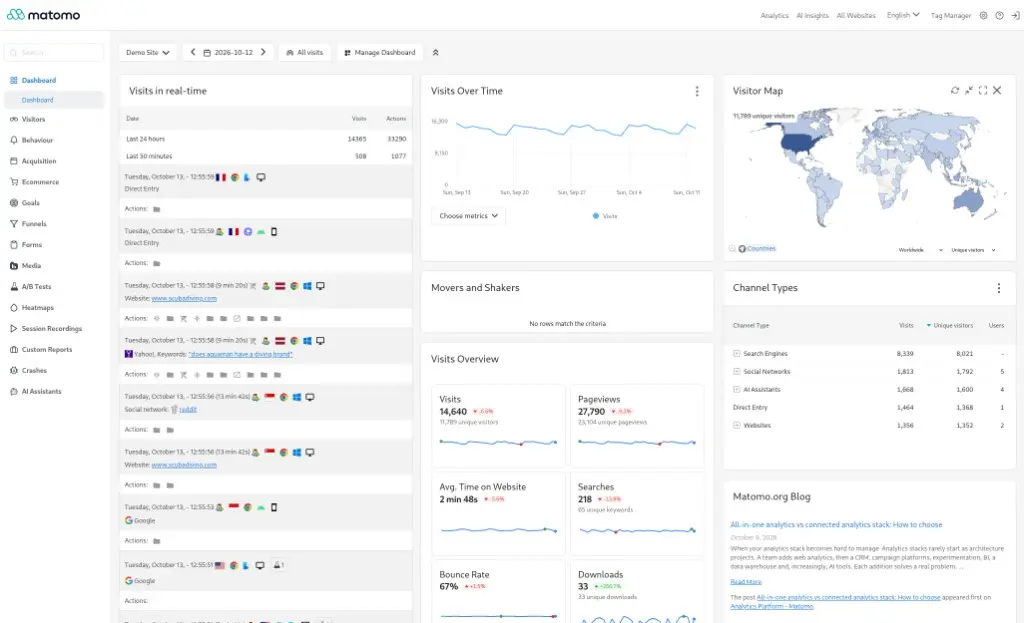
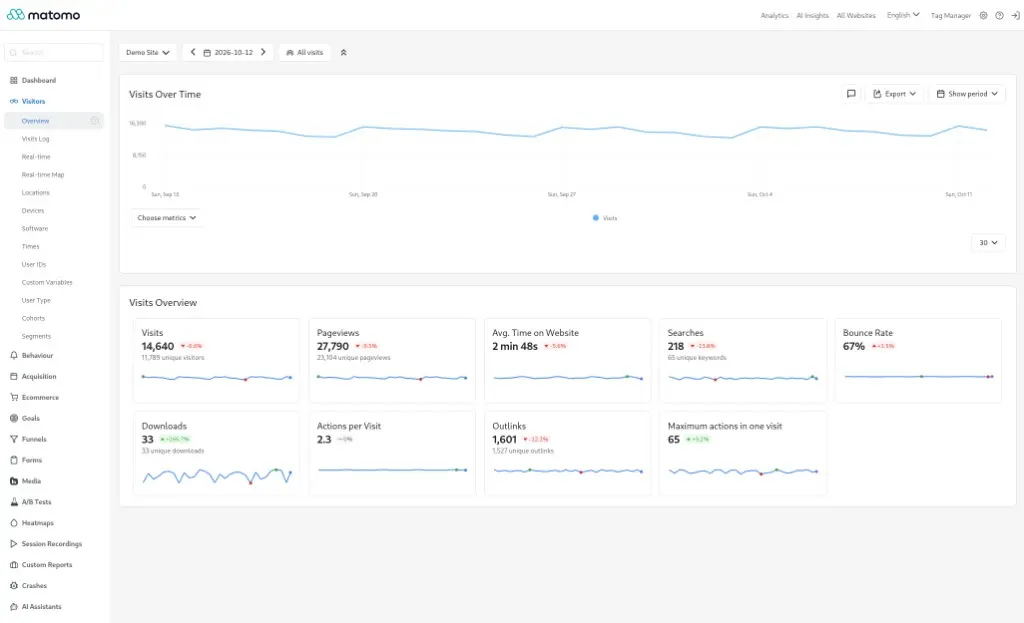
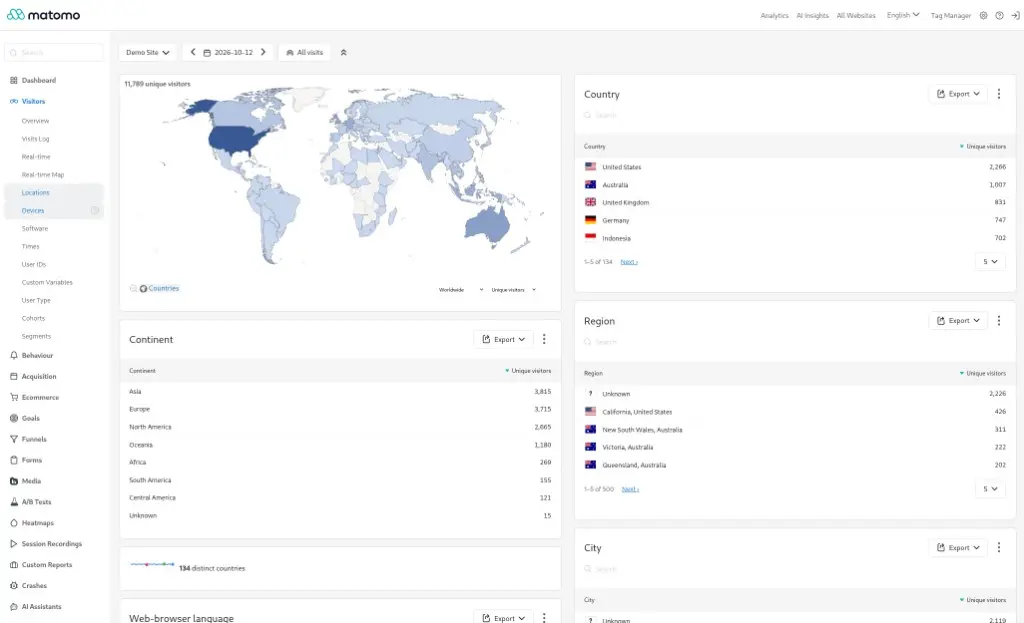
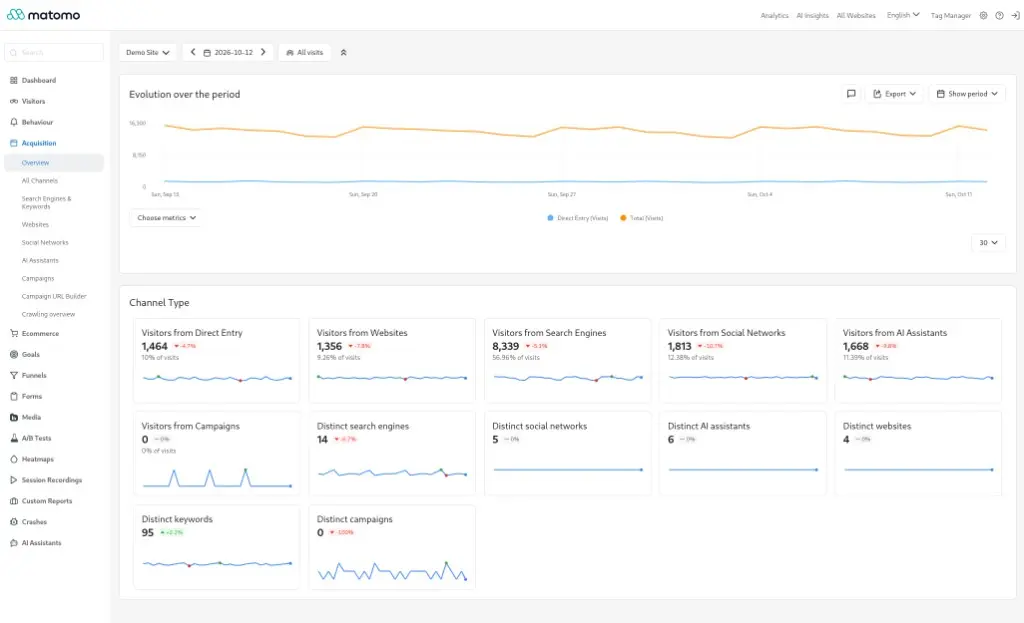
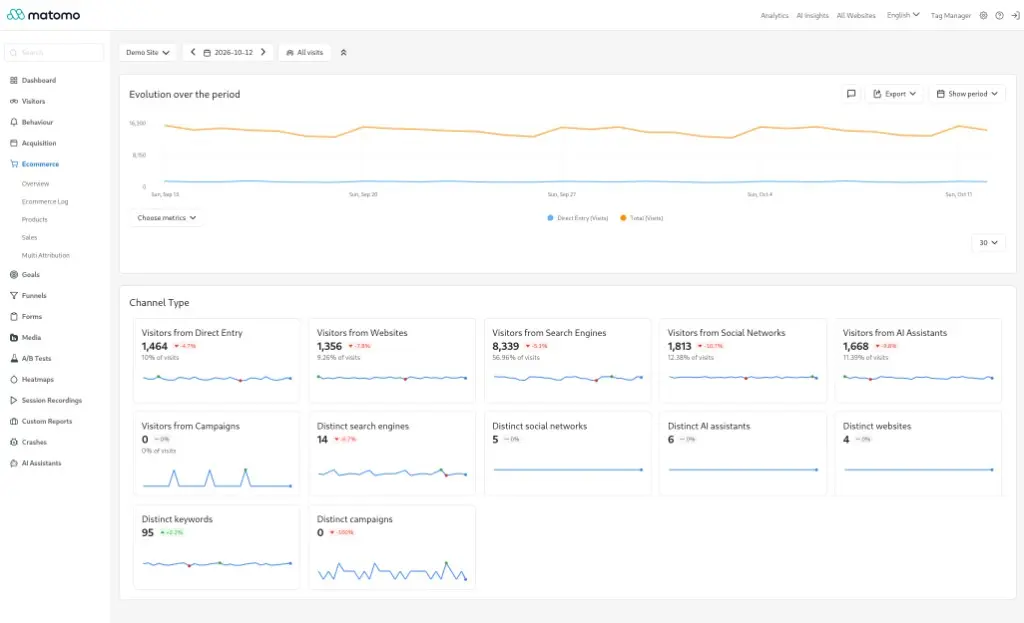
After the installer you land on the reports. The screens below are from the public Matomo demo, captured on 13 October 2026, with the interface in English. The site in the demo is called Demo Site. On your server the sections are the same, and the numbers will be yours.
Reports on a schedule
Without a scheduled job, Matomo builds the report at the moment you open it. Once a site has more than a few hundred visits a day, the panel gets slow because of that. Matomo asks you to run core:archive every hour and to turn off counting from the browser.
Open /var/www/matomo/config/config.ini.php and add this line to the [General] section that is already there. Do not create a second section:
browser_archiving_disabled_enforce = 1sudo touch /var/log/matomo-archive.log
sudo chown www-data:www-data /var/log/matomo-archive.log
sudo tee /etc/cron.d/matomo-archive >/dev/null < /var/log/matomo-archive.log
CRON
sudo -u www-data /usr/bin/php /var/www/matomo/console core:archive --url=https://analytics.example.com/In --url, put the panel address with a slash at the end, not the address of the site you measure. The cron file needs an empty line at the end. The log sits outside the site directory: it contains install details.
If you installed through Fastpanel, add the same job under Management → Scheduler (Управление → Планировщик). In ispmanager it is in the scheduler too. The job user is the site owner, not www-data. Write browser_archiving_disabled_enforce in config/config.ini.php inside the site directory. The command:
/usr/bin/php /var/www/SITEUSER/data/www/analytics.example.com/console core:archive --url=https://analytics.example.com/Use your own directory. In ispmanager the path can differ from Fastpanel: take it from the site card.
The code on your site
On the last step the installer shows a JavaScript snippet. Put it on the site you measure, before the closing </body>. You do not put that code on the panel address a second time.
Your own server does not replace consent. The script still reads the visit in the browser, so its name belongs in the privacy policy and in the consent banner. This is a new counter, not a continuation of an old account. You can import the nginx log instead of the script, but then the report is about requests to the server, not about how a person moved through the pages. GoAccess and AWStats read that log without installing a new panel.
What this install does not do
- No session recording. Heatmaps and recordings are a separate plugin, not the free core. The nginx config above does not open that file.
- Reports from a counter you already use do not move over by themselves.
- No hosted cloud and no one-click install. The panel on this VPS is yours, and you update it.
- A site with more than a million actions a month is outside this guide. For that traffic Matomo recommends a separate database server. That is a different setup.
Questions
What server does Matomo need?
Up to 100,000 page views a month, Matomo recommends one server: 2 CPU, 2 GB RAM, 50 GB SSD. Up to a million page views, still one server, but 4 CPU, 8 GB RAM, and 250 GB SSD. On the requirements page both figures are the minimum recommended setup for that load. Above a million actions a month, Matomo wants the database and the panel on two servers.
Can I install Matomo through Fastpanel?
Yes, if the system is clean. Fastpanel has its own install command. After that the interface only needs a PHP site and a database. In ispmanager the Matomo steps are the same, once the panel is already installed: a new site and a new database. You do not install nginx, PHP, and MariaDB by hand.
Is there a one-click Matomo image?
Not in this guide. You rent a VPS and install nginx, PHP, and MariaDB yourself, or you create the site and database in a panel. Matomo Cloud on someone else’s servers is not part of this article.
Does this install include session recording?
No. Session recording and heatmaps are a separate plugin, not the free version.
Does the Matomo script belong in the privacy policy?
Yes. The server is yours, but the script sits on the site and reads the visit in the browser. Name it in the privacy policy and in the consent banner.
No email, no trackers — just the update feed.