
Qwen3.8-27B Uncensored on clore.ai is a text model with 27 billion parameters. It answers questions, writes drafts and helps with code on a rented GPU. The refusal filter of the public Qwen3.8-27B is removed in this Heretic build. The prompt stays on the rented machine and does not go to a public chat.
Below are two ways to run the same build. Q6_K is sized for a 32 GB GPU. Q8_0 is the most accurate file in this repository, and it runs on an RTX PRO 6000 Blackwell with 96 GB. The Qwen3.8 line also comes in sizes that do not fit on one GPU. The numbers 735 and 882 in the repository name are the author’s own measurements on ARC tests, not an independent ranking. The model card license is Apache 2.0.
Removing the refusal filter does not cancel the law. Do not ask for text that harms people, helps fraud or involves minors.
What this model is for
For an ordinary user it is their own chat: draft a letter, walk through an error in a command, sketch a plan or a short story. A public service cuts some of those requests off with a refusal. This build removes the refusal, and the text itself is computed on the GPU you rented on clore.ai.
The base is the official Qwen3.8-27B. On top of it are several fine-tunes and a merge, then another Heretic pass. The file has a reasoning mode: before the answer the model writes a thinking block. On the author’s card, ordinary tasks are recommended at temperature 1.0, top_p 0.95, top_k 20 and a repeat penalty of 1.0. These parameters are the same for both ways.
How Q6_K differs from Q8_0
Both ways install the same build. The image, the ports and the llama.cpp build stay shared. The file, the GPU and the context length differ.
Q6_K is 23,582,382,688 bytes, about 22 GB. It runs on one 32 GB GPU, for example an RTX 5090, with a context of 16,384 tokens. On the checked RTX 5090 that context used about 24 GB of 32 GB.
Q8_0 is 29,787,699,808 bytes. It is the most accurate file in the repository: the author did not publish BF16 weights. It runs on one RTX PRO 6000 Blackwell with 96 GB at the model’s native context, 262,144 tokens. A 48 GB GPU holds Q8_0 with a short context, without room for 262,144 tokens. How local models work, and how a quant differs from full weights, is covered in Local AI models: what to run them on.
In the chat it feels like this.
- Conversation length. On Q6_K a long thread or a large paste pushes out the start of the dialogue. On Q8_0 the same conversation fits a long instruction, a large piece of code and a long thread of messages. This is the most noticeable difference.
- A short answer. A letter, a plan and a story of a few sentences come out similar on both files. Q8_0 is closer to the original weights, so it less often misses an exact name, a number or dense code. On an ARC measurement the author rated the 4-bit file at about 99% of the 8-bit file. Q6_K sits between them, so on a short prompt the quality step is small.
- Waiting. A faster GPU with the same 32 GB shortens the pause on Q6_K. The text for the same file stays the same: the quant sets the quality. Q8_0 reads more memory for each token. A 96 GB GPU shortens that pause. The core count by itself does not improve the answer.
- Cost and download. Q6_K downloads faster and runs on a more available hourly GPU. Q8_0 takes longer to download and needs a 96 GB GPU.
If the GPU has 24 GB, Q6_K does not fit. Take Q4_K_M from the same repository instead. Files with MTP in the name are not needed for a first run: they are faster only while the model accepts the second predicted token on at least half of the steps.
Ordering on clore.ai
The order and the build below are shared. On the clore.ai marketplace, turn on the price in USD per hour. For Q6_K find one 32 GB GPU. For Q8_0 find one RTX PRO 6000 Blackwell with 96 GB. Before you pay, open Balance. If the balance is zero, the Rent button will not create the order.
In the rental dialog:
- Order type is On-Demand. Spot is cheaper, but the machine can be taken back in the middle of the download: the Q6_K file is about 22 GB, and Q8_0 is about 28 GB.
- The image on the checked order is Ubuntu 20.04.6 with PyTorch 2.0.1+cu117, not
pytorch/pytorch:2.7.1-cuda12.8-cudnn9-devel. That image has no gcc and no nvcc, and glibc is 2.31. Prebuilt llama.cpp binaries for Ubuntu are built against glibc 2.38 and do not start. The CUDA 12.8 compiler is installed from the packages in the build section. The LLM tab has a ready Ollama image, ollama/ollama. Do not take it for this file: the card is aimed at Llama 3 and Mistral, and this GGUF architecture is qwen35. A ready Ollama build often does not open this file. The 8 GB label on the card is the minimum for the image itself, not the file size. The ComfyUI image does not fit either: it starts a different interface. - Ports are 22/tcp and 8080/http. The first is for SSH, the second is for the llama.cpp chat. The web port must be http, not tcp.
- Pay from the balance and confirm. The SSH address and the link for port 8080 appear in My Orders. Until the model file is downloaded, the port 8080 page is empty: the chat server is started after the build.
If the container does not start and the log shows a CUDA version newer than the host driver, take a CUDA image no newer than the version on the server card. The commands below install the compiler themselves: the checked image does not include it.
Building llama.cpp
Connect over SSH from My Orders. First check that the GPU is visible. The checked image has no nvcc: the packages cuda-nvcc-12-8, cuda-cudart-dev-12-8, cuda-cccl-12-8, libcublas-dev-12-8 and libcurand-dev-12-8 install the CUDA 12.8 compiler. Add /usr/local/cuda-12.8/bin to PATH, or the nvcc command is not found. The flag -DGGML_CUDA=ON enables the GPU. The RTX 5090 and the RTX PRO 6000 Blackwell are the same architecture, so the build for both ways needs -DCMAKE_CUDA_ARCHITECTURES=120. Without that flag the finished server does not compute on these GPUs. The build target is only llama-server. Do this build once for both ways.
nvidia-smi
apt-get update
apt-get install -y git cmake build-essential wget ca-certificates \
  cuda-nvcc-12-8 cuda-cudart-dev-12-8 cuda-cccl-12-8 libcublas-dev-12-8 libcurand-dev-12-8
export PATH=/usr/local/cuda-12.8/bin:$PATH
mkdir -p /workspace
cd /workspace
git clone --depth 1 https://github.com/ggml-org/llama.cpp
cd llama.cpp
cmake -B build -DGGML_CUDA=ON -DCMAKE_CUDA_ARCHITECTURES=120
cmake --build build --config Release -j"$(nproc)" --target llama-server
The finished file is /workspace/llama.cpp/build/bin/llama-server. The build on a rented GPU takes a few minutes.
Installing Q6_K
This way is for one 32 GB GPU. The repository is DavidAU/Qwen3.8-27B-TURBO-Fable-Cold-Fusion-735-882-Heretic-Uncensored-NEO-CODER-MAX-MTP-GGUF. Take the plain Q6_K quant, without the letters MTP in the name. The context is 16,384 tokens. The -c flag on wget resumes the file from the break. After the download the size must be exactly 23582382688. A short file means the download broke: run the same wget again. If the byte count stops growing, run the same command again: the -c flag continues the file.
mkdir -p /workspace/models
wget -c -O /workspace/models/Qwen3.8-27B-TurboFCFusion-735-882-Here-Uncen-NEO-CODER-MAX-Q6_K.gguf \
  https://huggingface.co/DavidAU/Qwen3.8-27B-TURBO-Fable-Cold-Fusion-735-882-Heretic-Uncensored-NEO-CODER-MAX-MTP-GGUF/resolve/main/Qwen3.8-27B-TurboFCFusion-735-882-Here-Uncen-NEO-CODER-MAX-Q6_K.gguf
stat -c %s /workspace/models/Qwen3.8-27B-TurboFCFusion-735-882-Here-Uncen-NEO-CODER-MAX-Q6_K.gguf
On this image, code-server already listens on 127.0.0.1:8080, so the flag --host 0.0.0.0 does not take the port: the log says couldn’t bind HTTP server socket. Start the chat on the eth0 address and on the same port 8080. The public link in My Orders, the CLORE.AI ML Tools page, goes to nginx on port 80, not to llama-server. Leave code-server running: the web editor opens through it. The message field is the Llama Chat button, in the section below.
cd /workspace/llama.cpp
HOST=$(ip -4 -o addr show eth0 | awk '{print $4}' | cut -d/ -f1)
nohup ./build/bin/llama-server \
  -m /workspace/models/Qwen3.8-27B-TurboFCFusion-735-882-Here-Uncen-NEO-CODER-MAX-Q6_K.gguf \
  --host "$HOST" \
  --port 8080 \
  -c 16384 \
  -ngl 99 \
  --jinja \
  --temp 1.0 \
  --top-p 0.95 \
  --top-k 20 \
  --repeat-penalty 1.0 \
  > /workspace/llama.log 2>&1 &
tail -f /workspace/llama.log
Wait in the log for the lines model loaded and listening with port 8080, then open that port’s link in My Orders. Loading the weights into memory takes about a minute. You can close the SSH session after that line: the process was started with nohup and writes the log to /workspace/llama.log.
Installing Q8_0
This way is for one RTX PRO 6000 Blackwell with 96 GB. The file is plain Q8_0, without the letters MTP in the name. The context is 262,144 tokens. If a Q6_K chat is already listening on this machine, stop it, or port 8080 stays taken.
pkill -f llama-serverAfter the download the size must be exactly 29787699808.
mkdir -p /workspace/models
wget -c -O /workspace/models/Qwen3.8-27B-TurboFCFusion-735-882-Here-Uncen-NEO-CODER-MAX-Q8_0.gguf \
  https://huggingface.co/DavidAU/Qwen3.8-27B-TURBO-Fable-Cold-Fusion-735-882-Heretic-Uncensored-NEO-CODER-MAX-MTP-GGUF/resolve/main/Qwen3.8-27B-TurboFCFusion-735-882-Here-Uncen-NEO-CODER-MAX-Q8_0.gguf
stat -c %s /workspace/models/Qwen3.8-27B-TurboFCFusion-735-882-Here-Uncen-NEO-CODER-MAX-Q8_0.gguf
cd /workspace/llama.cpp
HOST=$(ip -4 -o addr show eth0 | awk '{print $4}' | cut -d/ -f1)
nohup ./build/bin/llama-server \
  -m /workspace/models/Qwen3.8-27B-TurboFCFusion-735-882-Here-Uncen-NEO-CODER-MAX-Q8_0.gguf \
  --host "$HOST" \
  --port 8080 \
  -c 262144 \
  -ngl 99 \
  --jinja \
  --temp 1.0 \
  --top-p 0.95 \
  --top-k 20 \
  --repeat-penalty 1.0 \
  > /workspace/llama.log 2>&1 &
tail -f /workspace/llama.log
The lines model loaded and listening with port 8080 mean the Q8_0 chat is up. The link is the same one from My Orders. On the checked RTX PRO 6000 a context of 262,144 fit: after loading, about 44 GB of 96 GB is in use. A log warning that the default port will change to 9931 in a future release does not change the order port: the flag --port 8080 still opens the chat on the order port. Q8_0 weights take longer to load than Q6_K because the file is larger.
Where to type the message
The web interface link in My Orders opens the CLORE.AI ML Tools page. Jupyter Lab and Visual Studio Code Web are code editors. There is no message field there.
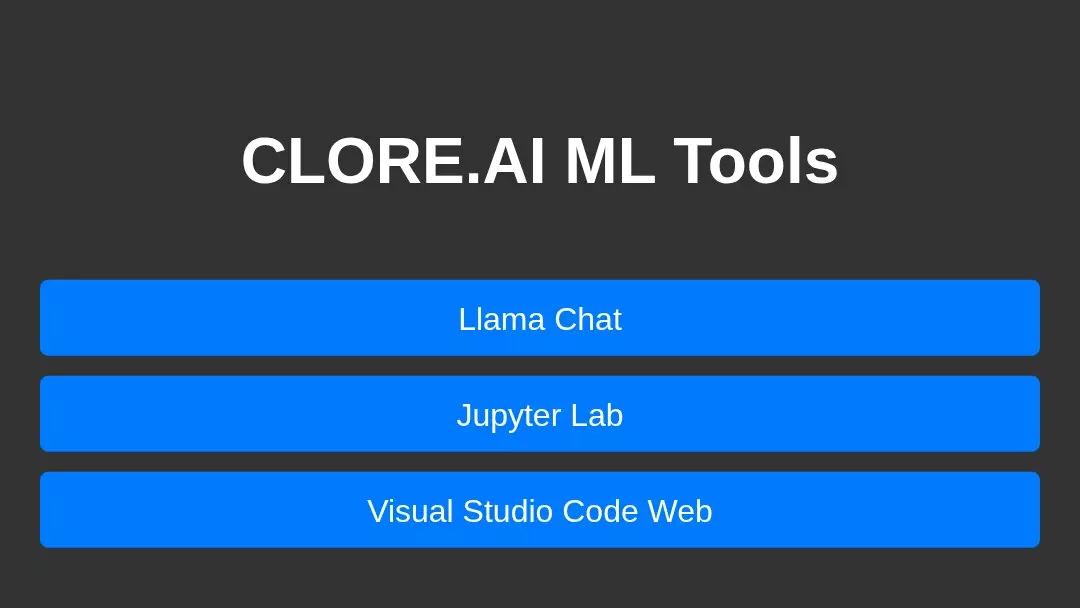
The chat is the Llama Chat button. The image does not show it until you add it: nginx on port 80 serves the menu, and llama-server listens on the eth0 address and port 8080. The snippet below proxies the /chat/ path to that address and puts the button first.
HOST=$(ip -4 -o addr show eth0 | awk '{print $4}' | cut -d/ -f1)
export HOST
python3 - << 'PY'
import os
from pathlib import Path
ip = os.environ["HOST"]
nginx = Path("/etc/nginx/sites-enabled/default")
text = nginx.read_text()
block = """
    location /chat/ {
        proxy_pass http://%s:8080/;
        proxy_http_version 1.1;
        proxy_set_header Host $host;
        proxy_set_header Upgrade $http_upgrade;
        proxy_set_header Connection "upgrade";
        proxy_buffering off;
        proxy_read_timeout 3600s;
    }

""" % ip
if "location /chat/" not in text:
    text = text.replace("    location /code-server/ {", block + "    location /code-server/ {", 1)
    nginx.write_text(text)
index = Path("/var/www/html/index.html")
html = index.read_text()
needle = '<a class="link" href="/jupyter">Jupyter Lab</a>'
if "Llama Chat" not in html:
    html = html.replace(needle, '<a class="link" href="/chat/">Llama Chat</a>\n        ' + needle, 1)
    index.write_text(html)
PY
nginx -t && nginx -s reload
After nginx reports a successful test, refresh the menu page and click Llama Chat.
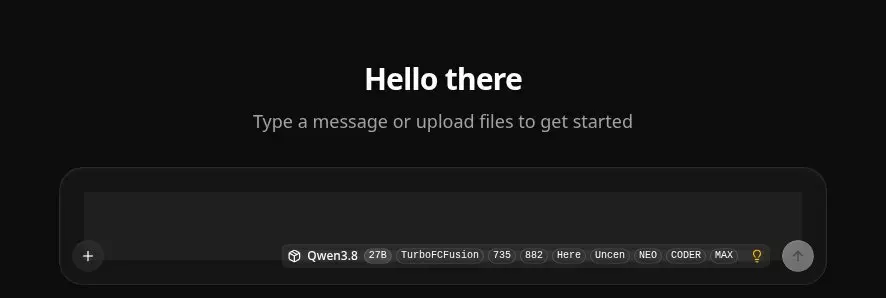
In the chat, the line Type a message or upload files to get started sits above the field. Type in the dark box under it. The grey arrow on the right sends the message. The labels Qwen3.8 and 27B show that the right file is open.
Test prompt
The check is the same for both ways. In the dark field under the line Type a message or upload files to get started, send:
Write a short story about a red bicycle on wet cobblestones in the morning. Eight sentences, no swearing.The model first writes a reasoning block, then the story itself. While the reasoning runs, the page may show no final text for a few seconds. That is the normal mode of the Qwen3.8 template, not a freeze. The finished answer is a coherent story about the bicycle, with no refusal and no jump to another topic. On a short prompt like this, Q6_K and Q8_0 produce similar text. The Q8_0 difference shows up on a long dialogue and on exact details, as in the section above.
Common questions
How much memory does Q6_K need?
The file is 23,582,382,688 bytes. With a context of 16,384 tokens it is sized for a 32 GB GPU. On the checked RTX 5090 it used about 24 GB of 32 GB.
Which GPU does Q8_0 need?
The Q8_0 file is 29,787,699,808 bytes. With a context of 262,144 tokens, one RTX PRO 6000 Blackwell with 96 GB holds it.
Where does the difference show up?
On a short letter or story the answers are similar. On Q8_0 a long conversation and a large paste do not push out the beginning: a context of 262,144 tokens versus 16,384 on Q6_K. Exact names, numbers and dense code stay a little steadier on Q8_0. A faster GPU with the same 32 GB speeds up Q6_K; the text for the same file stays the same.
Why does the port 8080 page not open?
On the checked image, code-server already holds 127.0.0.1:8080, so --host 0.0.0.0 does not start. The chat listens on the eth0 address and port 8080. The log needs the lines model loaded and listening. The order port is 8080/http. The Ollama and ComfyUI images do not start this chat.
Why does the answer start with a long reasoning block?
The Qwen3.8 template turns reasoning mode on by default. The final text comes after that block.
What is this model for?
For your own chat on a rented GPU: a draft, a walkthrough of a command, a short text. The prompt does not go to a public service. The refusal filter of the public Qwen3.8-27B is removed in this build, and the law does not change.
No email, no trackers — just the update feed.